


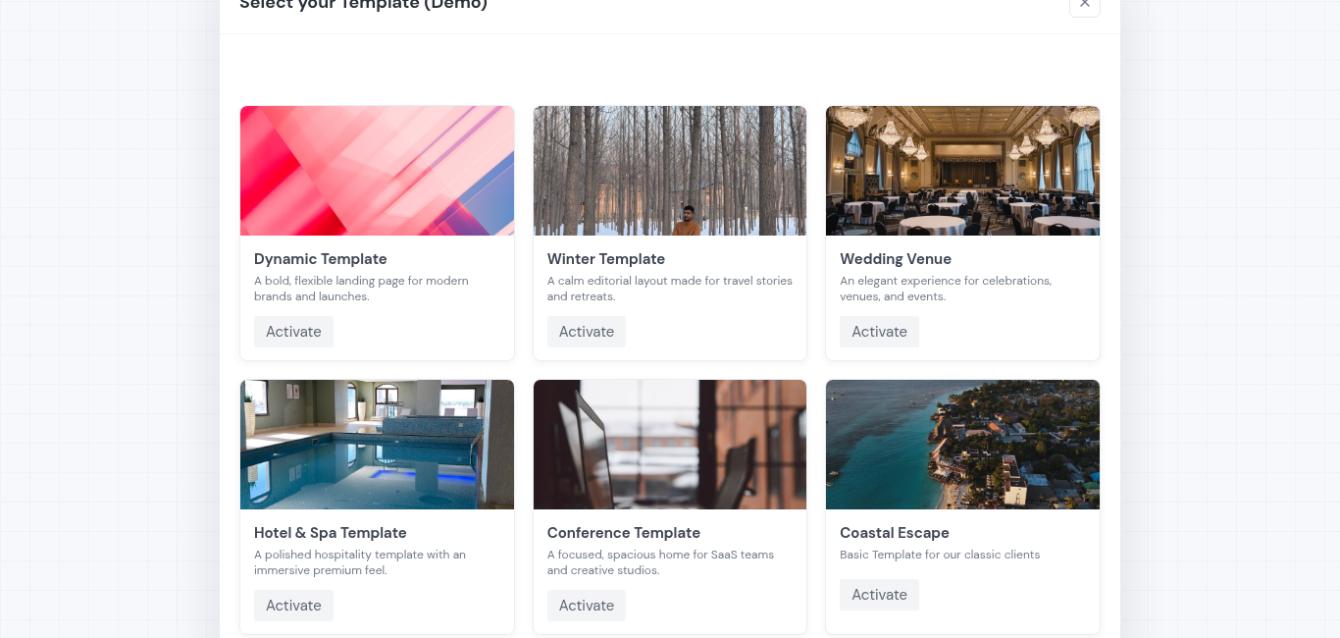
This is not another blog post giving you a Canva-made PDF to download, edit and send.A modern hotel proposal template can do much more than that.With ETHERIA, hotels can build multiple proposal templates for different audiences and sales scenarios, personalize them for each client, share them as web-based interactive proposals, update them even after they have been sent, and track when clients return to view them.
Whether you are preparing a quote for an individual guest, a corporate booking, a group, a wedding or an event, the idea is simple:
Start with the right template. Personalize it. Share it. Update it when needed. Track what happens next.
1. Build Multiple Hotel Proposal Templates
One proposal template should not have to work for every enquiry.With ETHERIA, you can build a reusable library of proposal templates and activate the right one depending on the client, venue, department or occasion.
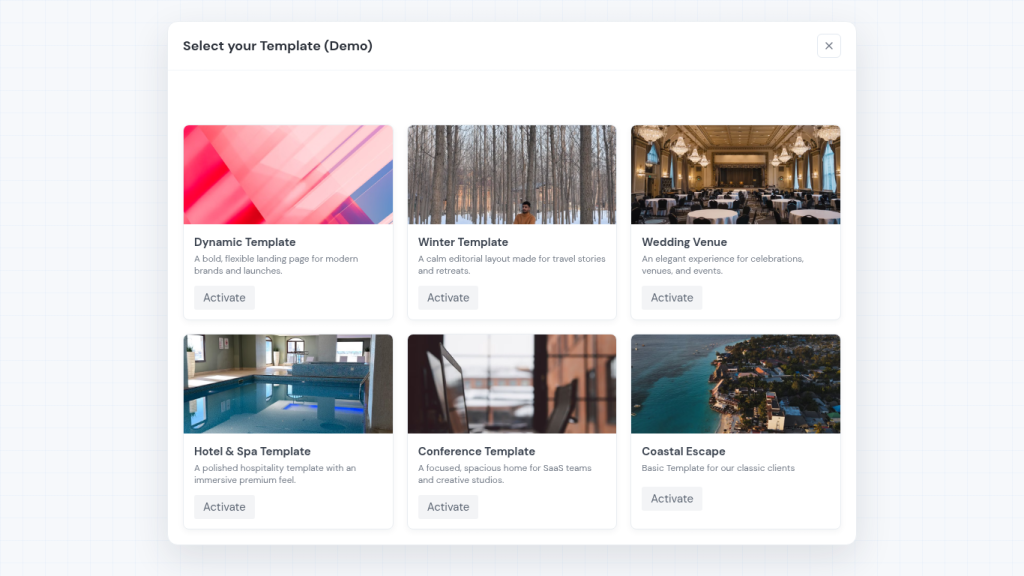
For example, your hotel could have:
- Event Proposal — Venue 1
- Event Proposal — Venue 2
- Wedding Proposal
- Hotel & Spa Proposal
- Conference Proposal
- Corporate Booking Proposal
- Group Booking Proposal
- Individual Guest Proposal
Each template can have its own hero image, colours, client greeting, branding and content structure.
You can also decide whether destination or hotel information should be automatically included, helping your team avoid rebuilding the same content every time an enquiry arrives.
A spa enquiry should not receive the same proposal as a corporate group. An event in your rooftop venue may need completely different content and imagery from an event in your ballroom.The template gives you the starting point. The enquiry determines what happens next.
2. Personalize the Template for Each Client
Templates create efficiency, but they should not make your proposals feel templated.
Once you select the appropriate template, you can customize the proposal according to what the client actually requested.
For an individual guest, that could mean presenting specific room options, upgrades, airport transfers or additional experiences.
For a corporate or group booking, the proposal could focus on accommodation requirements, negotiated options and relevant services.
For an event, you may present the selected venue, F&B options, accommodation, equipment and additional event services.
The structure stays reusable while the actual offer becomes a personalized proposal for that specific client.
That is the difference between simply sending a quote and creating a more relevant hotel sales experience.
3. Change the Proposal Anytime (Even After Sending)
This is where a web-based proposal becomes fundamentally different from a traditional PDF.With a static PDF, every significant change normally creates another version:
Create → Export → Send → Change → Export Again → Send Again
But hotel enquiries rarely stay completely static.
A company may change the number of rooms. An event organiser may choose another venue. A guest may request a different room type. A service or price may need to be adjusted.
Because ETHERIA proposals are web-based, you can update the existing proposal even after it has already been shared.
The client continues using the same proposal link while you update the information behind it.
Instead of sending Proposal-V2, Proposal-Final and Proposal-Final-2, the process becomes:
Create → Share → Update → Client Views Updated Proposal
That keeps the sales conversation much cleaner for both sides.
4. Share by Link, QR Code or Email
Once the proposal is ready, it can be shared in different ways depending on the sales situation.
You can use a personalized customer link, generate a QR code, or use the matching email template created for the proposal.
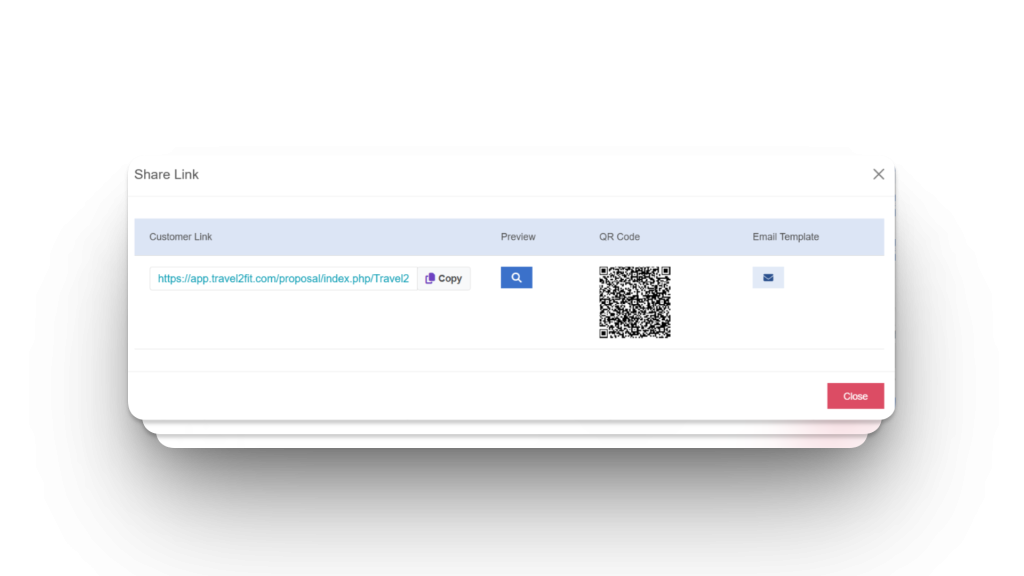
A reservations team may simply copy the customer link into an existing conversation. An event sales team may use a QR code during a meeting or venue presentation. For a more complete branded experience, the hotel can use the HTML email template connected to the proposal.
Here is the complete workflow:
The important part is that all these sharing methods lead back to the same personalized, web-based proposal.
5. Matching HTML Email Templates for Every Proposal
The proposal experience can start before the client even opens the proposal.
ETHERIA can create an HTML email template according to the proposal template being used.
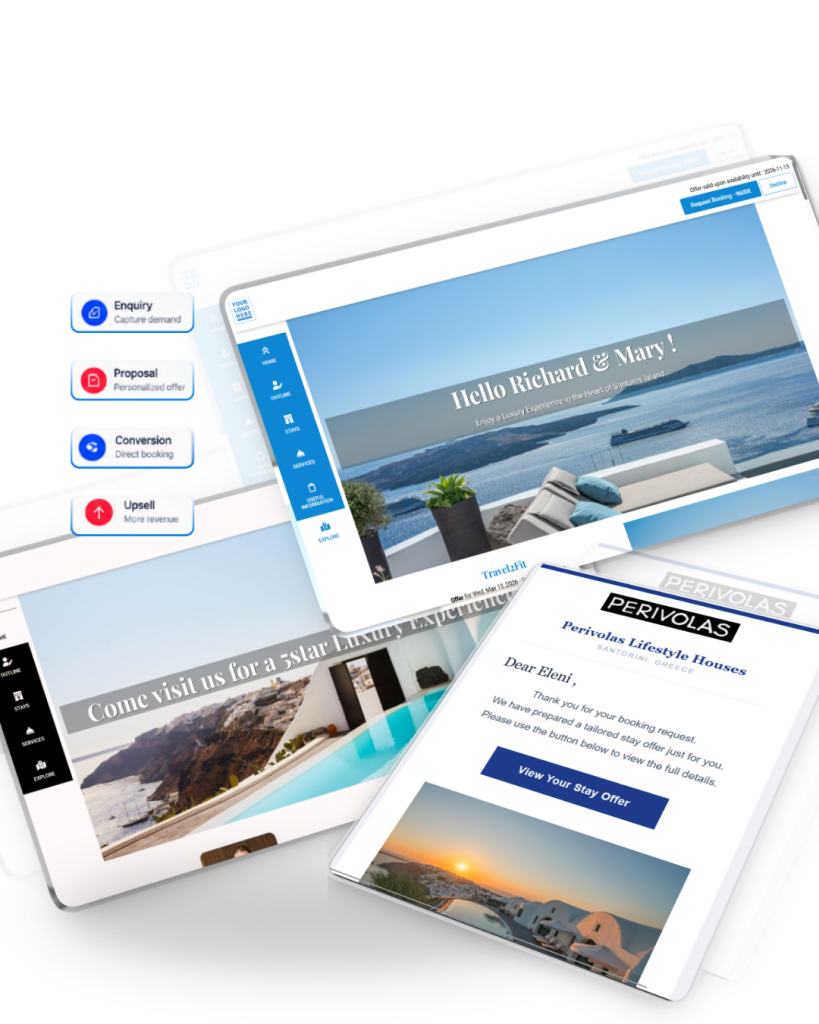
The email can automatically include elements such as the proposal’s hero image and hotel logo, helping the communication visually match the offer the client is about to see.
You can then simply copy and paste the HTML into your email, customize the wording if needed and send it through your normal workflow.
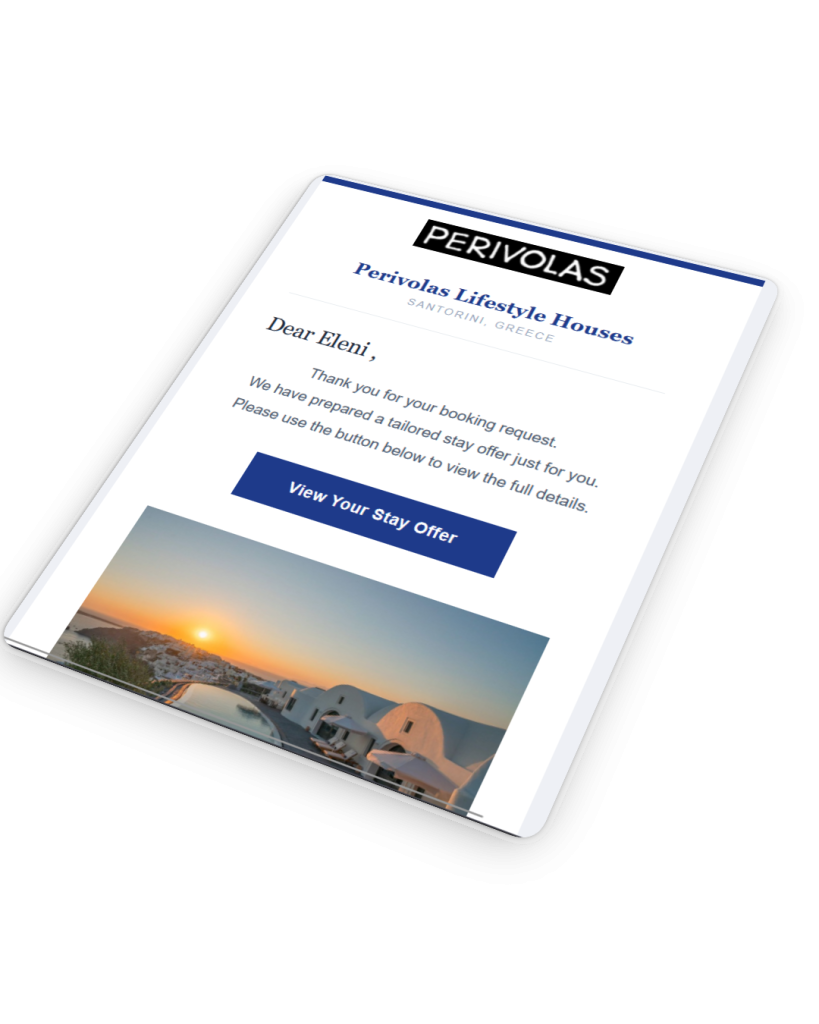
The email includes a clear CTA:
View Your Proposal
That CTA links directly to the client’s personalized proposal.So instead of sending a generic message with a PDF attachment, the journey becomes:
Select Template → Create Proposal → Generate Matching HTML Email → Customize → Send → View Your Proposal
The hotel saves time without giving up control over the final message.
6. Track When Clients View the Proposal
Sending a proposal should not mean losing visibility over what happens next.ETHERIA includes proposal tracking, allowing the hotel team to see when the personalized proposal has been viewed and review its viewing history.
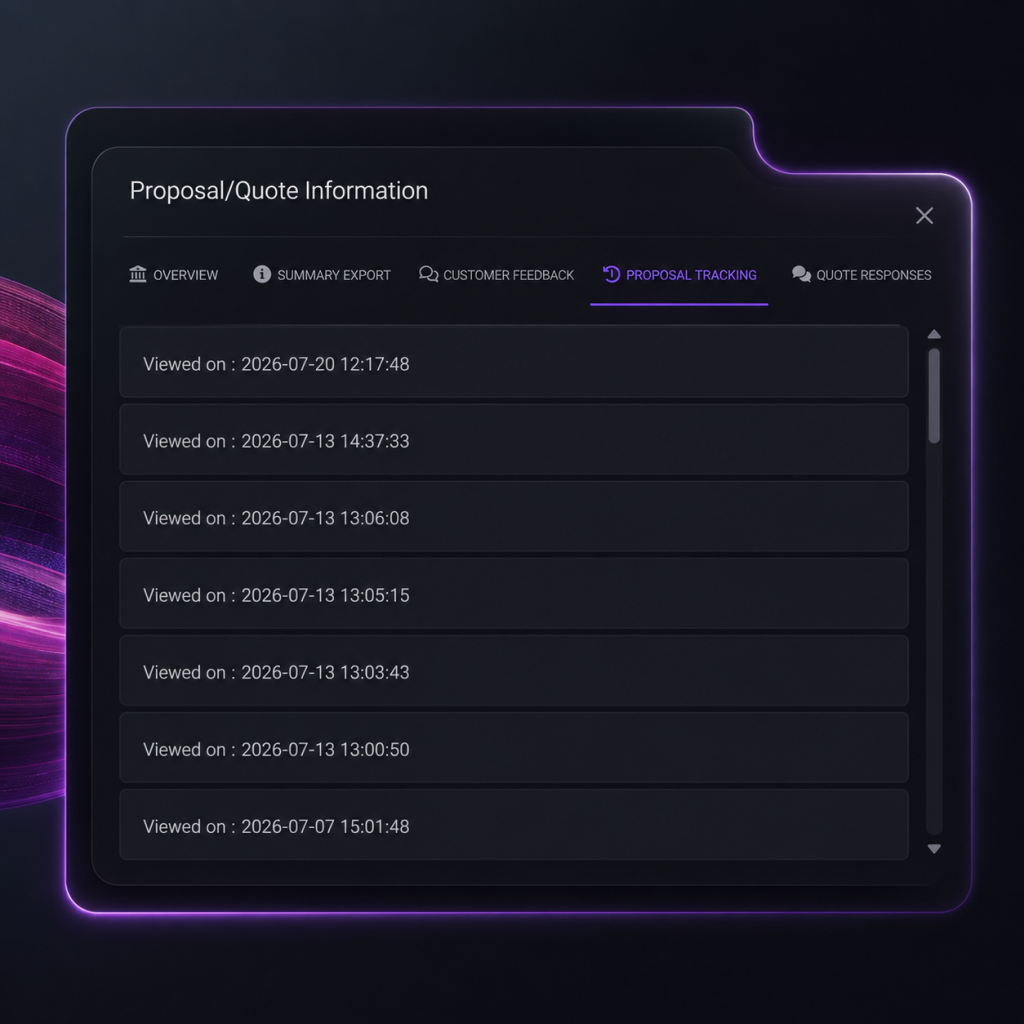
That gives sales and reservations teams useful context for follow-up.Rather than sending another message without knowing whether the client has even opened the proposal, the team can see whether it has been viewed — or whether the client has returned to it multiple times.
The process becomes:
Proposal Sent → Client Views → View Tracked → Follow Up
This can be particularly valuable for corporate, group and event enquiries where the decision process may take several days and involve several interactions.
From a Hotel Proposal Template to a Flexible Sales Process
A good hotel proposal template should save time.But it should also help your team create a better experience for the person receiving the offer.
With ETHERIA by Travel2Fit, hotels can build multiple templates for different audiences and venues, personalize them for specific enquiries, share them through a link, QR code or branded HTML email, update them after sending and track when clients view them.
Instead of:
Download → Edit → Export → Send
the proposal process becomes:
Create Templates → Personalize → Share → Track → Update → Follow Up
That is the next step beyond the traditional hotel proposal template!
Frequently Asked Questions
What is a hotel proposal template?
A hotel proposal template is a reusable structure used to prepare personalized offers for individual guests, corporate bookings, groups, events and other hotel sales enquiries.
Can hotels create multiple proposal templates?
Yes. Different templates can be created for individual guests, venues, events, weddings, spa services, corporate bookings, groups and other sales scenarios.
Can a hotel proposal be changed after it has been sent?
Yes. Because the proposal is web-based, it can be updated after it has been shared while the client continues accessing the same personalized proposal link.
How can an ETHERIA proposal be shared?
A proposal can be shared using a personalized customer link, QR code or a customized HTML email containing a View Your Proposal CTA.
Can hotels track when a proposal is viewed?
Yes. ETHERIA provides proposal tracking so hotel teams can see when a personalized proposal has been viewed and use that information as additional context for follow-up.
Do you want to see ETHERIA in action & use the platform 1 MONTH FOR FREE?Fill the form & we will contact you soon !
Want to learn more? Visit our MICE & Group Proposals dedicated page.